








Midlands Lifestyle
Advertisement
  • Home
  • News
    • All
    • Business
    • Politics
    • Science
    • World
    Elon Musk’s record spending on Republicans failed in fierce midterms

    Elon Musk’s record spending on Republicans failed in fierce midterms

    Butchers in Balsall Common closed after car crashes through shop

    Butchers in Balsall Common closed after car crashes through shop

    Kellogg’s admits snap, crackle and pop is quieter after uproar over Rice Krispies recipe change

    Kellogg’s admits snap, crackle and pop is quieter after uproar over Rice Krispies recipe change

    UK and EU agree draft deal to scrap Brexit red tape over food exports

    UK and EU agree draft deal to scrap Brexit red tape over food exports

    Cricket Media Club awards: Ollie Robinson, Naayva Sharma and Ethan Bamber win prizes

    Cricket Media Club awards: Ollie Robinson, Naayva Sharma and Ethan Bamber win prizes

    Asda hires former Morrisons boss David Potts in bid to grow firm

    Asda hires former Morrisons boss David Potts in bid to grow firm

    Trending Tags

    • Trump Inauguration
    • United Stated
    • White House
    • Market Stories
    • Election Results
  • Tech
    • All
    • Apps
    • Gadget
    • Mobile
    • Startup
    Cult Phone-Maker Nothing’s Mystery Screenless AI Device Is Coming Next Month

    Cult Phone-Maker Nothing’s Mystery Screenless AI Device Is Coming Next Month

    Garmin Connect may share cyclist location data with Waze

    Garmin Connect may share cyclist location data with Waze

    ‘You Don’t Put Your Head in the Sand for 4 Years’: Colossal CEO Ben Lamm on Working With Trump

    ‘You Don’t Put Your Head in the Sand for 4 Years’: Colossal CEO Ben Lamm on Working With Trump

    Google looks like it’s working on a new YouTube time limit option

    Google looks like it’s working on a new YouTube time limit option

    Vizio smart TVs are ignoring tracking opt-outs, continue to send data even when sitting idle

    Vizio smart TVs are ignoring tracking opt-outs, continue to send data even when sitting idle

    A major Android TV box maker just got busted by Google for running a malware racket

    A major Android TV box maker just got busted by Google for running a malware racket

    Trending Tags

    • Nintendo Switch
    • CES 2017
    • Playstation 4 Pro
    • Mark Zuckerberg
  • Entertainment
    • All
    • Gaming
    • Movie
    • Music
    • Sports
    60 Charming Christmas 2026 Gifts for Children

    60 Charming Christmas 2026 Gifts for Children

    Pearl Jam Still Auditioning Drummers Following Matt Cameron Split

    Pearl Jam Still Auditioning Drummers Following Matt Cameron Split

    Neil Patrick Harris’ Nazi Villain Movie With Strong RT Score Is Out Today

    Neil Patrick Harris’ Nazi Villain Movie With Strong RT Score Is Out Today

    Felt Like Wearing Sonic Blue Today

    Felt Like Wearing Sonic Blue Today

    What I Packed for a Fall Trip to the Swiss Alps

    What I Packed for a Fall Trip to the Swiss Alps

    The Song That Sharon Osbourne Would Want Played at Her Funeral

    The Song That Sharon Osbourne Would Want Played at Her Funeral

  • Lifestyle
    • All
    • Fashion
    • Food
    • Health
    • Travel
    Treats, Toys and Luxury Carriers: Gifts for the Pet Lover Who Wants to Spoil Their Furry Friend

    Treats, Toys and Luxury Carriers: Gifts for the Pet Lover Who Wants to Spoil Their Furry Friend

    The Best Holiday-Party Items to Shop From Zara

    The Best Holiday-Party Items to Shop From Zara

    2026 Ultimate Holiday Gift Guide (For Everyone On Your List!)

    2026 Ultimate Holiday Gift Guide (For Everyone On Your List!)

    Vegan Mushroom Wellington Recipe with Walnuts and Spinach

    Vegan Mushroom Wellington Recipe with Walnuts and Spinach

    Dates, Meaning and Where to Attend Abroad

    Dates, Meaning and Where to Attend Abroad

    12 Holiday Nail Designs for 2026 to Try This Season

    12 Holiday Nail Designs for 2026 to Try This Season

    Trending Tags

    • Golden Globes
    • Game of Thrones
    • MotoGP 2017
    • eSports
    • Fashion Week
  • Review
    Leak TruStream review: a gifted network audio player that just lacks a bit of dynamic headroom

    Leak TruStream review: a gifted network audio player that just lacks a bit of dynamic headroom

    The fastest handheld we’ve tested

    The fastest handheld we’ve tested

    Liquid Web web hosting review

    Liquid Web web hosting review

    Elegoo M1 Ultra 3D Scanner review

    Elegoo M1 Ultra 3D Scanner review

    Asus ProArt P14 (2026, RTX Spark) Review

    Asus ProArt P14 (2026, RTX Spark) Review

    SwitchBot Lock Vision Pro Review

    SwitchBot Lock Vision Pro Review

No Result
View All Result
  • Home
  • News
    • All
    • Business
    • Politics
    • Science
    • World
    Elon Musk’s record spending on Republicans failed in fierce midterms

    Elon Musk’s record spending on Republicans failed in fierce midterms

    Butchers in Balsall Common closed after car crashes through shop

    Butchers in Balsall Common closed after car crashes through shop

    Kellogg’s admits snap, crackle and pop is quieter after uproar over Rice Krispies recipe change

    Kellogg’s admits snap, crackle and pop is quieter after uproar over Rice Krispies recipe change

    UK and EU agree draft deal to scrap Brexit red tape over food exports

    UK and EU agree draft deal to scrap Brexit red tape over food exports

    Cricket Media Club awards: Ollie Robinson, Naayva Sharma and Ethan Bamber win prizes

    Cricket Media Club awards: Ollie Robinson, Naayva Sharma and Ethan Bamber win prizes

    Asda hires former Morrisons boss David Potts in bid to grow firm

    Asda hires former Morrisons boss David Potts in bid to grow firm

    Trending Tags

    • Trump Inauguration
    • United Stated
    • White House
    • Market Stories
    • Election Results
  • Tech
    • All
    • Apps
    • Gadget
    • Mobile
    • Startup
    Cult Phone-Maker Nothing’s Mystery Screenless AI Device Is Coming Next Month

    Cult Phone-Maker Nothing’s Mystery Screenless AI Device Is Coming Next Month

    Garmin Connect may share cyclist location data with Waze

    Garmin Connect may share cyclist location data with Waze

    ‘You Don’t Put Your Head in the Sand for 4 Years’: Colossal CEO Ben Lamm on Working With Trump

    ‘You Don’t Put Your Head in the Sand for 4 Years’: Colossal CEO Ben Lamm on Working With Trump

    Google looks like it’s working on a new YouTube time limit option

    Google looks like it’s working on a new YouTube time limit option

    Vizio smart TVs are ignoring tracking opt-outs, continue to send data even when sitting idle

    Vizio smart TVs are ignoring tracking opt-outs, continue to send data even when sitting idle

    A major Android TV box maker just got busted by Google for running a malware racket

    A major Android TV box maker just got busted by Google for running a malware racket

    Trending Tags

    • Nintendo Switch
    • CES 2017
    • Playstation 4 Pro
    • Mark Zuckerberg
  • Entertainment
    • All
    • Gaming
    • Movie
    • Music
    • Sports
    60 Charming Christmas 2026 Gifts for Children

    60 Charming Christmas 2026 Gifts for Children

    Pearl Jam Still Auditioning Drummers Following Matt Cameron Split

    Pearl Jam Still Auditioning Drummers Following Matt Cameron Split

    Neil Patrick Harris’ Nazi Villain Movie With Strong RT Score Is Out Today

    Neil Patrick Harris’ Nazi Villain Movie With Strong RT Score Is Out Today

    Felt Like Wearing Sonic Blue Today

    Felt Like Wearing Sonic Blue Today

    What I Packed for a Fall Trip to the Swiss Alps

    What I Packed for a Fall Trip to the Swiss Alps

    The Song That Sharon Osbourne Would Want Played at Her Funeral

    The Song That Sharon Osbourne Would Want Played at Her Funeral

  • Lifestyle
    • All
    • Fashion
    • Food
    • Health
    • Travel
    Treats, Toys and Luxury Carriers: Gifts for the Pet Lover Who Wants to Spoil Their Furry Friend

    Treats, Toys and Luxury Carriers: Gifts for the Pet Lover Who Wants to Spoil Their Furry Friend

    The Best Holiday-Party Items to Shop From Zara

    The Best Holiday-Party Items to Shop From Zara

    2026 Ultimate Holiday Gift Guide (For Everyone On Your List!)

    2026 Ultimate Holiday Gift Guide (For Everyone On Your List!)

    Vegan Mushroom Wellington Recipe with Walnuts and Spinach

    Vegan Mushroom Wellington Recipe with Walnuts and Spinach

    Dates, Meaning and Where to Attend Abroad

    Dates, Meaning and Where to Attend Abroad

    12 Holiday Nail Designs for 2026 to Try This Season

    12 Holiday Nail Designs for 2026 to Try This Season

    Trending Tags

    • Golden Globes
    • Game of Thrones
    • MotoGP 2017
    • eSports
    • Fashion Week
  • Review
    Leak TruStream review: a gifted network audio player that just lacks a bit of dynamic headroom

    Leak TruStream review: a gifted network audio player that just lacks a bit of dynamic headroom

    The fastest handheld we’ve tested

    The fastest handheld we’ve tested

    Liquid Web web hosting review

    Liquid Web web hosting review

    Elegoo M1 Ultra 3D Scanner review

    Elegoo M1 Ultra 3D Scanner review

    Asus ProArt P14 (2026, RTX Spark) Review

    Asus ProArt P14 (2026, RTX Spark) Review

    SwitchBot Lock Vision Pro Review

    SwitchBot Lock Vision Pro Review

No Result
View All Result
Midlands Lifestyle
No Result
View All Result
Home Tech Apps

I wish more people knew about these 7 buried Android features

by Midlands Lifestyle
21 June 2026
in Apps
0
I wish more people knew about these 7 buried Android features
0
SHARES
7
VIEWS
Share on FacebookShare on Twitter


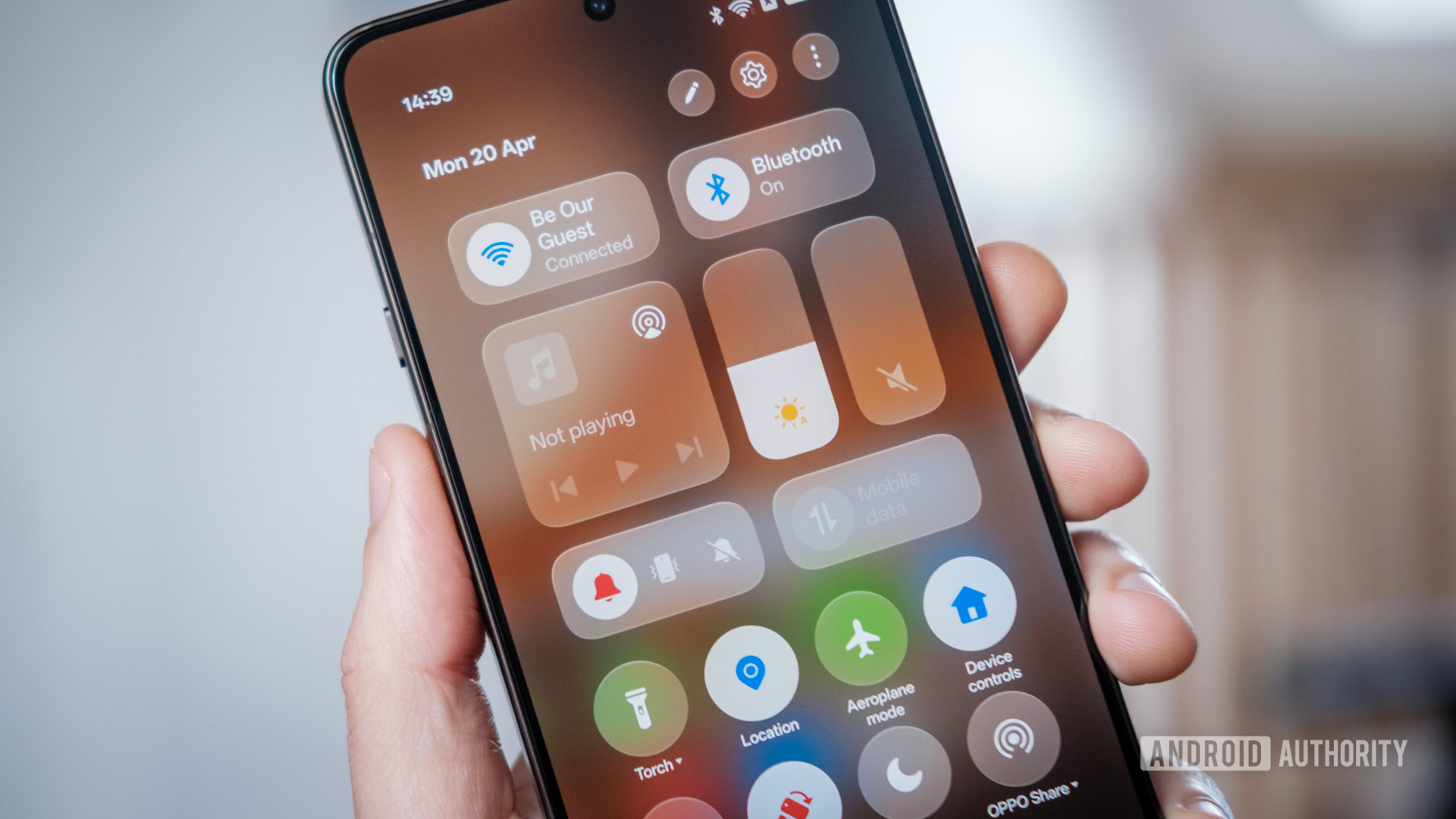
Robert Triggs / Android Authority

I’ve been writing about Android smartphones for years, so I know a lot of the tricks and hidden features that can improve a user’s experience. At the same time, I’m constantly finding out about features that went unnoticed by me thanks to complicated menus and differing Android skins.

Once I discover these features, though, I become akin to a street preacher sharing the good news of Android optimization. And today I’m here to share some of the most useful buried features I wish more people knew about.

Which buried Android feature do you find the most useful?

802 votes

1. Android’s built-in privacy dashboard

the privacy dashboard on an android phone

Megan Ellis / Android Authority

You can see the permissions each app has access to in your app settings, but Android also has a built-in privacy dashboard that makes this information easier to digest at a glance. It highlights the permissions that apps have accessed in the past 24 hours in a useful chart. You can also see a summary of specific permissions and which apps have accessed them over the past day.

This dashboard has helped me revoke permissions that I have accidentally granted in the past. For example, I realized that X (Twitter) had a contacts permission that I didn’t remember granting. It also flagged several other apps that were accessing my contacts unnecessarily.

To access the privacy dashboard, you can go to Settings > Security & privacy > Privacy dashboard. On Samsung’s One UI, the steps differ slightly. You will need to go to Settings > Security and privacy > Permissions used in last 24 hours. However, Samsung’s version doesn’t include the handy chart.

2. QR codes for sharing Wi-Fi connections

qr code for a wi fi network

Megan Ellis / Android Authority

More often than not, when someone wants me to connect to their home Wi-Fi network, they give me the name and password. But there’s a much simpler way to allow others to connect to your network — sharing an easily generated QR code.

The exact process depends on the smartphone brand you’re using — some automatically show the QR code when you select the option to share a network on your phone, while others require you to select it as the sharing method. But the basic steps are usually to go to your Wi-Fi settings and access the current network’s sharing options.

QR codes make sharing Wi-Fi networks easy, removing the need to remember or share your password.

On Samsung Galaxy phones, for example, you need to go to Settings > Connections > Wi-Fi and then select the cog icon next to your current network. At the bottom of the screen, there’s a button for QR code.

To scan a QR code using your device, you will also need to go to your Wi-Fi settings and select the scan icon. This means you don’t have to worry about using Google Lens, your phone’s camera, or a QR code scanning app.

3. Setting up metered connections

option to treat a connection as metered on samsung galaxy s23 ultra

Megan Ellis / Android Authority

I usually carry multiple phones around with me, either as part of reviews I’m doing, or because I’m playing Pokémon Go. But rather than having a SIM for each, I use one data SIM — either in my main phone or in a travel router.

However, I quickly encountered a problem with this privacy-focused approach. My connected phones were treating my hotspot as a regular Wi-Fi connection, meaning that they quickly used up my limited data plan. I could set a limit for the hotspot, but this wouldn’t solve the issue of one phone updating its OS while connected, using up my whole bundle for the month.

This setting prevents connected devices from using up my entire mobile data plan.

That’s when I discovered the option to set up a metered connection. The option makes your phone treat the network similarly to a mobile network, limiting its data usage. While this setting is notably absent on my HONOR smartphone, you can set it on other devices.

For example, on a Samsung Galaxy smartphone, you can open the settings for a Wi-Fi network, select the View more dropdown, and then tap on Metered network. Set the option to Treat as metered so that your phone treats it like a mobile network.

4. Holding down on a Quick Settings shortcut

Quick Settings on the Motorola Razr Fold's cover screen.

Joe Maring / Android Authority

It’s no secret that Android is a mess of menus and settings that can become difficult to navigate. The ability to search your settings makes it easier to find things, but even then certain items may not show up, like the settings for your default launcher.

This mess becomes even more confusing when switching between devices with different Android skins. For example, my Samsung device has its eye comfort settings in its display settings, but my HONOR smartphone has a dedicated menu for all its eye care features.

You can skip menus completely by using your Quick Settings icons as shortcuts.

That’s why this trick is one of my favorites. If you have a certain setting in your Quick Settings — the icons located within the control panel you access when swiping down on your phone’s screen — you can use it as a shortcut to customize and access the feature. Usually, people just use this to switch a setting on and off, but if you hold down on an icon, it will take you to that feature’s settings page.

This means your Do Not Disturb icon isn’t only for switching the feature on and off. If you want to adjust your schedule, for example, you can hold down the icon to access its settings.  Holding down on the Eye Comfort icon takes me to the page where I can set its warmth and tweak other settings. The trick means you spend less time lost in menus or searching for specific terms.

5. Changing what your power button does

changing power button settings

Megan Ellis / Android Authority

Call me old-fashioned, but I believe that you should be able to switch your phone off with your power button. It’s in the name. But in recent years, that button has turned into a shortcut for Gemini. You can already access the AI tool using your voice and its wake word, but Google decided that another shortcut was necessary and commandeered the power button.

If you’re like me and don’t need a physical button for Gemini, you can actually change what your power button does. This setting is buried in different places depending on your smartphone brand. My S26 Ultra review unit has it under Settings > Advanced features > Side button > Long press. This allows you to switch it to a different assistant or to the power menu.

On HONOR devices, the setting is within the accessibility settings. You can go to Settings > Accessibility features > Shortcuts & gestures > Press and hold Power button. If you’re struggling to find the setting on your device, I recommend searching for “power button” in your settings.

6. Customizing your Quick Settings

editing quick settings on an android smartphone

Megan Ellis / Android Authority

When you set up your phone, you get a default set of Quick Settings icons that are enabled. If your phone’s setup wizard didn’t take you through any customization, the panel may be full of features you never use.

But you can customize your Quick Settings so that your most-used features are at the forefront. You can also discover a bunch of new Quick Settings depending on the apps that you have installed. For example, Home Assistant gives me access to a range of Quick Settings shortcuts that I can configure with the service. TickTick also has an Add Task tile that I can use.

To access the customization menu for the panel, navigate to your Quick Settings and select the pencil icon. Then select Edit or Add Tile to select and change the shortcuts available in the Quick Settings section. You can also drag and drop the shortcuts to adjust their order in the panel.

7. Notification channels

Notifications on a Samsung phone.

Joe Maring / Android Authority

Notifications used to be a useful way to keep abreast of important updates from apps, but have become a way for companies to relentlessly force engagement. This is most insidious when it comes to apps that you do want to receive a few notifications from, but which also send a bunch of unimportant updates.

For example, I want to receive notifications for when my Uber Eats order is on its way. But I rarely order takeout, so notifications about specials and promotions are useless to me. That’s where notification channels come in.

Notification channels are groups of notifications on an app that can be disabled individually. So, for an app like Uber Eats, I can silence promotions while still getting important delivery updates. The drawback is that while all notifications must be assigned to a channel as of Android 8, not all developers do this in good faith. I’ve found a number of apps that simply have one channel and no way to configure notifications from within the app.

For the apps that do allow you to manage your notifications, you can access their channels on the app info page. To access this, head to Settings > Apps > Manage apps > [App name] > Notifications. On this page, you should see the different channels under Notification type.

Samsung makes this setting extra difficult to use, since notification channel management isn’t enabled by default. To enable it, first go to Settings > Notifications > Advanced settings, and toggle on Manage notification categories for each app. Then, to access the notification channels for a specific app, head to Settings > Apps > [App name] > Notifications > Notification categories. Here you can toggle the specific categories you want to enable or disable.

If you’re not sure which channel a notification belongs to, you can wait for one to appear on your home screen. Depending on your smartphone, you either need to hold down on the notification or swipe left to access the notification settings. This takes you to the notifications channels page, with the corresponding category flashing.

While not foolproof, it can go a long way towards getting your notifications under control.


Android phones don’t always do the best job of surfacing the most useful tricks and settings. Plus, the open-source nature of the OS means that each brand tweaks its own version of the software differently.

I feel like I’m constantly finding new tricks that optimize the way that I use my phone. I just wish Android made it easier to access them so that they weren’t hidden gems.

Thank you for being part of our community. Read our Comment Policy before posting.


Source link

Tags: AndroidburiedFeaturesKnewpeople
Previous Post

All Your Wearables Have One Glaring Weakness. What Can You Do About It?

Next Post

Image-based abuse is not just nudes, warns actress

Midlands Lifestyle

Next Post
Image-based abuse is not just nudes, warns actress

Image-based abuse is not just nudes, warns actress

Leave a Reply Cancel reply

Your email address will not be published. Required fields are marked *

  • Trending
  • Comments
  • Latest
De’Longhi Pinguino GentleJet Inverter Review

De’Longhi Pinguino GentleJet Inverter Review

26 June 2026
FF14’s Naoki Yoshida teases Evolved Black Mage, Zephyr bird dyes, fishing changes, and the end of Poetics in a new Evercold Q&A

FF14’s Naoki Yoshida teases Evolved Black Mage, Zephyr bird dyes, fishing changes, and the end of Poetics in a new Evercold Q&A

1 November 2026
I Just Found Out There’s A Bunch Of Coraline Easter Eggs In Wildwood, So I Did A Deep Dive

I Just Found Out There’s A Bunch Of Coraline Easter Eggs In Wildwood, So I Did A Deep Dive

31 October 2026
John Healey’s Budget to shield low-income pensioners from income tax

John Healey’s Budget to shield low-income pensioners from income tax

26 October 2026
Jasmine Pineda Has Unexpected New Year Message For Boyfriend Matt Branis Who ‘Saved’ Her

Jasmine Pineda Has Unexpected New Year Message For Boyfriend Matt Branis Who ‘Saved’ Her

0
Anderson Cooper Says He Once ‘Hated’ New Year’s Eve While Co-Hosting CNN Broadcast

Anderson Cooper Says He Once ‘Hated’ New Year’s Eve While Co-Hosting CNN Broadcast

0
Best Student Internet Deals and Discounts

Best Student Internet Deals and Discounts

0
Dundee vs Dundee United: Tony Docherty and Jim Goodwin look ahead to Scottish Premiership derby at Dens Park | Football News

Dundee vs Dundee United: Tony Docherty and Jim Goodwin look ahead to Scottish Premiership derby at Dens Park | Football News

0
Treats, Toys and Luxury Carriers: Gifts for the Pet Lover Who Wants to Spoil Their Furry Friend

Treats, Toys and Luxury Carriers: Gifts for the Pet Lover Who Wants to Spoil Their Furry Friend

4 November 2026
60 Charming Christmas 2026 Gifts for Children

60 Charming Christmas 2026 Gifts for Children

4 November 2026
Elon Musk’s record spending on Republicans failed in fierce midterms

Elon Musk’s record spending on Republicans failed in fierce midterms

4 November 2026
Pearl Jam Still Auditioning Drummers Following Matt Cameron Split

Pearl Jam Still Auditioning Drummers Following Matt Cameron Split

4 November 2026

Recent News

Treats, Toys and Luxury Carriers: Gifts for the Pet Lover Who Wants to Spoil Their Furry Friend

Treats, Toys and Luxury Carriers: Gifts for the Pet Lover Who Wants to Spoil Their Furry Friend

4 November 2026
60 Charming Christmas 2026 Gifts for Children

60 Charming Christmas 2026 Gifts for Children

4 November 2026
Elon Musk’s record spending on Republicans failed in fierce midterms

Elon Musk’s record spending on Republicans failed in fierce midterms

4 November 2026
Pearl Jam Still Auditioning Drummers Following Matt Cameron Split

Pearl Jam Still Auditioning Drummers Following Matt Cameron Split

4 November 2026
We use cookies on our website to give you the most relevant experience by remembering your preferences and repeat visits. By clicking “Accept All”, you consent to the use of ALL the cookies. However, you may visit "Cookie Settings" to provide a controlled consent.
Cookie SettingsAccept All
Manage consent

Privacy Overview

This website uses cookies to improve your experience while you navigate through the website. Out of these, the cookies that are categorized as necessary are stored on your browser as they are essential for the working of basic functionalities of the website. We also use third-party cookies that help us analyze and understand how you use this website. These cookies will be stored in your browser only with your consent. You also have the option to opt-out of these cookies. But opting out of some of these cookies may affect your browsing experience.
Necessary
Always Enabled
Necessary cookies are absolutely essential for the website to function properly. These cookies ensure basic functionalities and security features of the website, anonymously.
CookieDurationDescription
cookielawinfo-checkbox-analytics11 monthsThis cookie is set by GDPR Cookie Consent plugin. The cookie is used to store the user consent for the cookies in the category "Analytics".
cookielawinfo-checkbox-functional11 monthsThe cookie is set by GDPR cookie consent to record the user consent for the cookies in the category "Functional".
cookielawinfo-checkbox-necessary11 monthsThis cookie is set by GDPR Cookie Consent plugin. The cookies is used to store the user consent for the cookies in the category "Necessary".
cookielawinfo-checkbox-others11 monthsThis cookie is set by GDPR Cookie Consent plugin. The cookie is used to store the user consent for the cookies in the category "Other.
cookielawinfo-checkbox-performance11 monthsThis cookie is set by GDPR Cookie Consent plugin. The cookie is used to store the user consent for the cookies in the category "Performance".
viewed_cookie_policy11 monthsThe cookie is set by the GDPR Cookie Consent plugin and is used to store whether or not user has consented to the use of cookies. It does not store any personal data.
Functional
Functional cookies help to perform certain functionalities like sharing the content of the website on social media platforms, collect feedbacks, and other third-party features.
Performance
Performance cookies are used to understand and analyze the key performance indexes of the website which helps in delivering a better user experience for the visitors.
Analytics
Analytical cookies are used to understand how visitors interact with the website. These cookies help provide information on metrics the number of visitors, bounce rate, traffic source, etc.
Advertisement
Advertisement cookies are used to provide visitors with relevant ads and marketing campaigns. These cookies track visitors across websites and collect information to provide customized ads.
Others
Other uncategorized cookies are those that are being analyzed and have not been classified into a category as yet.
SAVE & ACCEPT
No Result
View All Result

© 2026 Midland Lifestyle